Hey there, if you’ve ever worked with industrial robots, you know that even the tiniest little off-kilter adjustment can throw off a whole production line—especially when it comes to loading and unloading. I’m Jake, part of the team that builds and services loading and unloading robots, and I’ve seen way too many setups that get rushed through calibration, leading to parts getting scuffed, machines jamming, or worse. Today, I’m breaking down exactly what calibration for these robots actually looks like, no fancy engineering jargon overload, just real stuff we do every day to make sure our bots work like they’re supposed to. Loading and Unloading Robot
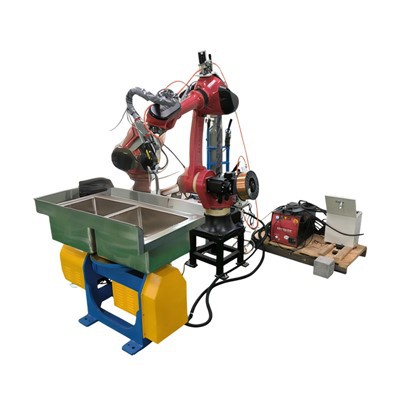
First off, let’s get one thing straight: calibration isn’t a one-and-done job. It’s a routine, layered process that starts before the robot even touches a part. When we deliver a new loading/unloading bot to a customer, the first step is initial mechanical alignment—and this is non-negotiable. Way too many people skip this or rush it, but think about it: the robot’s arm has joints, right? Each joint has gears, and if those gears aren’t lined up right from the get-go, the whole rest of the calibration is garbage. Here’s how we do that step: we use a basic but super reliable spirit level for the base first. If the bot is sitting even half a degree off, that’s like asking someone to catch a ball with a tilted glove—they might get close, but not consistently. Next, we check each joint’s rotational alignment. For that, we use a digital angle gauge, not just our eyes. We spin each joint through its full range of motion, marking the exact 0-degree position, and adjust the gear mounts until the robot hits that spot dead on. We also check the end effector (that’s the gripper or suction cup thing at the tip) to make sure it’s perfectly parallel to the floor when it’s supposed to be. Last week, we had a customer’s old bot that was scuffing aluminum parts because the end effector was tilted just 0.2 degrees—fixed that in 10 minutes with a quick alignment check.
Once the bot is mechanically aligned, we move on to kinematic calibration. This is the part where we teach the robot its own “body” and how it moves through space. All loading/unloading bots operate on a coordinate system—like an invisible grid where x is left/right, y is front/back, z is up/down. Kinematic calibration is about mapping that grid to the robot’s actual physical movement. Here’s what that looks like for us: we use a laser tracking device to shoot precise, known points around the robot’s work envelope (that’s the area the arm can reach). We program the robot to move to each of those exact points, and the laser tells us how close it got. If there’s a gap—say the robot is supposed to reach a point 100mm forward but only gets to 99.8mm—the software adjusts the kinematic model to account for that tiny error. A lot of lower-cost robot setups skip this, but that’s why their parts are consistently off. Also, for loading/unloading, we have to calibrate the “tool center point” (TCP) specifically. The TCP is the exact tip of the end effector that grabs the part—like, the very middle of the gripper’s fingers or the suction cup center. To calibrate TCP, we do a simple but repeatable test: we use a small, fixed pin in the work area, and program the robot to touch the pin with the end effector from multiple different angles. Where all those touches overlap is the true TCP. If that’s even a mm off, the robot might miss grabbing a part entirely, which causes downtime. We always double-check TCP at least twice on every new install—once during initial set, again after the first 8 hours of operation, because the gearboxes settle a bit as they break in.
Next up, load calibration—this is super specific to loading/unloading robots, because their whole job is picking up different weights, right? If you load a bot that’s calibrated for 5kg parts with a 10kg part, it’s going to slow down, or even drop it. Load calibration teaches the robot’s motor controllers how much force to apply for different weights. Here’s our process: we start with a known test weight that’s within the bot’s rated load range. We have the robot lift that weight from a fixed spot, move it to another fixed spot, and then set it down. We repeat this a few times, checking how the motor currents change and adjusting the load parameters. Then we do the same for different weights—say 25%, 50%, 75%, and 100% of the max load. We also test uneven loads, because sometimes a part isn’t perfectly centered in the gripper. For example, if you’re loading a metal sheet that’s a bit lopsided, the robot needs to adjust its grip strength so it doesn’t bend the sheet or let it slip. Last month, a client was having issues with thin steel sheets getting warped when their bot lifted them—turns out the load calibration was only done for flat, centered weights. We re-calibrated with uneven test loads, and that fixed the warping in the first run. Pro tip: always calibrate load settings after changing end effectors, too. If you swap a small gripper for a heavy-duty one, that adds extra weight the motors have to handle, and the robot won’t know about it unless you update the load calibration.
Now that the robot knows its body and how much it can lift, we move on to workspace calibration—this is all about making sure the bot hits the exact spots on the production line it’s supposed to. Loading/unloading bots work with specific machines: a CNC lathe, a press brake, a conveyor belt, whatever. So workspace calibration is aligning the robot’s coordinate system to the coordinate system of that machine. Here’s how we do it: we use a teach pendant (the little handheld controller) to move the robot to the exact point where a part needs to be loaded into the machine. Then we “teach” that point to the robot’s software. We do this for every key point: part pickup from the conveyor, load into the machine, unload from the machine, drop into a bin. But we don’t just teach one point—we do at least three points for each axis, so the software can map the whole workspace accurately. We also check for interference here. Like, if the robot’s arm swings too close to the machine’s spindle, we have to adjust the calibration so the path it takes doesn’t crash. A while back, we had a customer whose robot was hitting the machine’s door because their workspace calibration was off by 10mm. We re-taught the door’s position in the software, adjusted the robot’s path, and that was that. Also, if the conveyor belt moves parts (like, if it’s not perfectly positioned every time), we teach a “pickup offset” so the robot adjusts its grab spot a little to account for that—no more missed parts because the belt shifted.
After all that, we do dynamic calibration—this is for when the robot is actually moving at full speed, not just slow test runs. Static calibration works great for still points, but when the arm is swinging fast, centrifugal force and motor inertia throw things off. Dynamic calibration is super important for high-volume production lines where speed matters. We run the robot through a bunch of fast, repeated load/unload cycles, and use motion tracking cameras to see how the arm deviates while moving. The software adjusts the motor control algorithms to compensate for that. For example, if the robot’s wrist twists a little when moving a heavy part at high speed, dynamic calibration fixes that twist so the part stays straight as it’s loaded. We also do vibration checks here—if the robot’s arm is vibrating too much while moving, that can cause parts to be placed unevenly, or even damage the robot over time. Dynamic calibration cuts that vibration way down.
Wait, and we can’t forget periodic re-calibration—calibration isn’t a set-it-and-forget-it thing. Even after all that setup, over time, things shift: the factory floor settles, parts wear, the robot’s motors get a bit of play. We recommend customers do a full calibration check every 3 to 6 months, depending on how heavy the workload is. But we also have quick check steps they can do weekly, just to be safe: a quick TCP check by touching that little pin we talked about, or a test lift of a known weight. If they’re seeing consistent errors, like parts being placed 2mm off, that’s a sign it’s time for a full recal. We actually offer a remote calibration service too—most of the time, we can connect to the robot’s software and do a quick adjustment without even being on-site, which saves customers a ton of downtime.
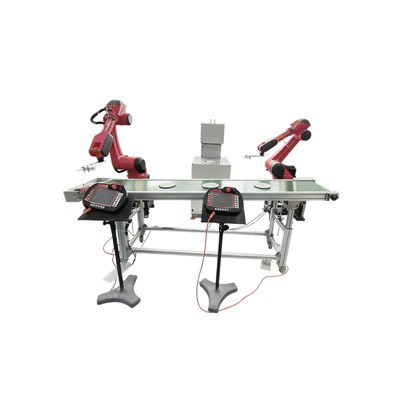
Now, I know some of you might be thinking, “Why go through all this trouble?” And honestly, it’s because bad calibration leads to real money lost. Downtime from a robot missing a part, scrap parts because they’re loaded wrong, damaged robot parts from a collision—all that adds up way more than the time we spend calibrating. Our team has spent years refining these procedures, and every one of our calibration steps is designed to cut down on that waste. At the end of the day, a loading/unloading robot is only as good as its calibration—even the fanciest robot on the line is useless if it’s not grabbing parts right or hitting the machine.
Stamping Robot If you’re shopping for a loading/unloading robot, or your current bot is giving you trouble with consistency or downtime, we can help. We don’t just sell bots—we know calibration inside and out, and we can walk you through the whole process, or come in to get your existing setup running perfectly. No pushy sales stuff, just real advice from people who build and service these robots day in and day out. Reach out to our team to chat about your specific needs, and we’ll make sure you’ve got a bot that works as reliably as it should.
References
- Craig, J. J. (Introduction to Robotics: Mechanics and Control. 4th ed. Pearson, 2020.)
- ISO 9283:1998, Robots and robotic devices — Manipulating industrial robots — Performance criteria and related test methods.
- Robotics Industries Association (RIA), “Guidelines for the Calibration of Industrial Robots”, RIA TR R10.6-2016.
- Zhang, H., et al. “Kinematic Calibration of Industrial Robots Using Laser Tracking Systems.” IEEE Transactions on Robotics, vol. 32, no. 2, 2016, pp. 456–467.
Dongguan Chuanglida Intelligent Equipments Co., Ltd.
As one of the most professional loading and unloading robot manufacturers and suppliers in China, we also support customized service. Please feel free to buy discount loading and unloading robot in stock here from our factory. For price consultation, contact us.
Address: Room 201, Building 2, No. 61, Shachang 1st Road, Dalang Town, Dongguan City, Guangdong Province
E-mail: haoguangli001@outlook.com
WebSite: https://www.boruntestech.com/
